The problem
A repeatable application can be consistently wrong. The useful investigation separates the recorded observation, a proposed explanation and a correction checked against a rule agreed before the experiment.
What was done in this recorded example · 4 stages
What you see
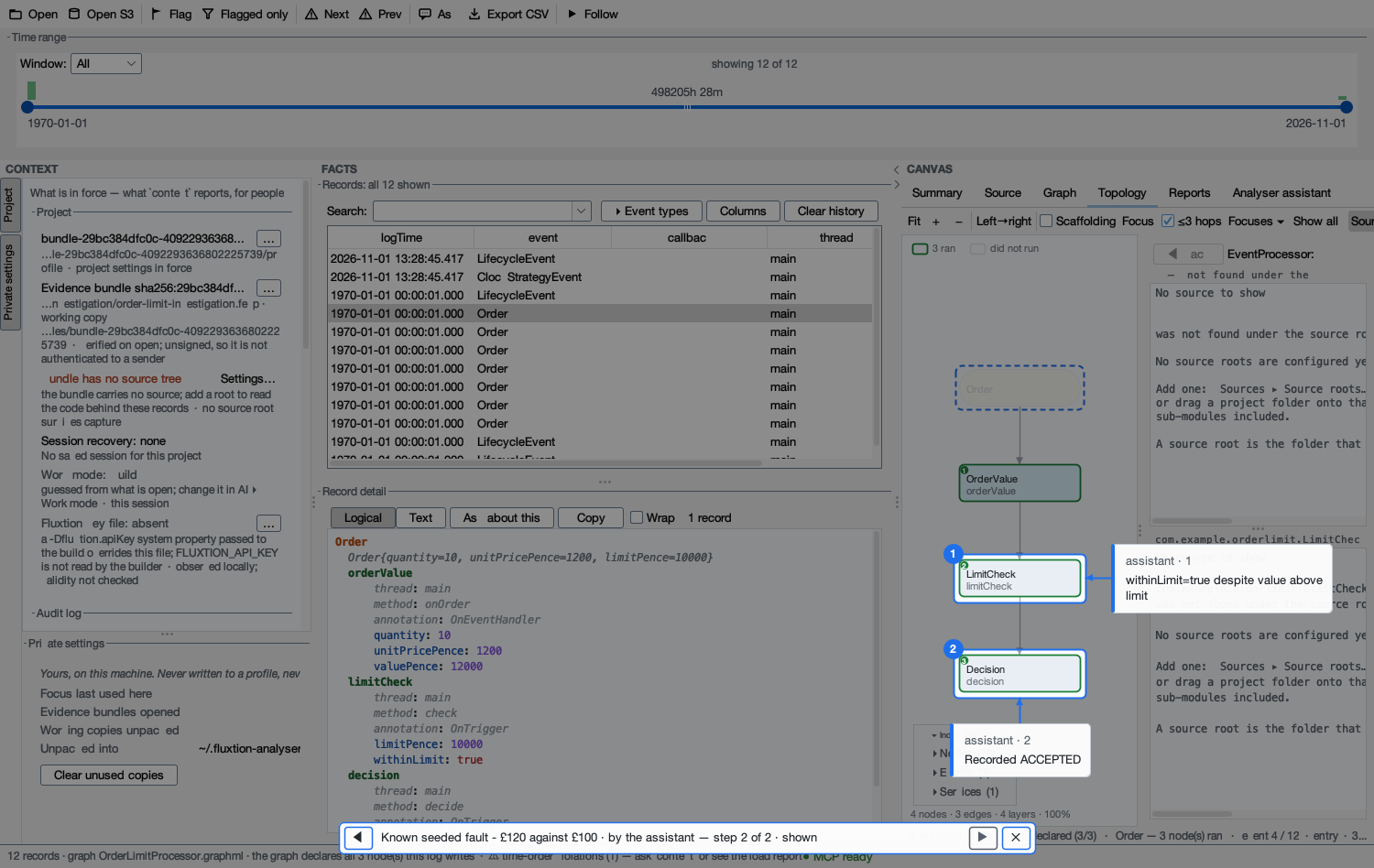
A GBP 120 order is ACCEPTED against a GBP 100 limit. The recorded value and limit agree with the input; the decision contradicts the rule.
What it means
The supplied LimitCheck source uses greater-than. It marks an above-limit order as within the limit, explaining the recorded contradiction.
What to change
Restore less-than-or-equal in the limit check. Keep downstream notification so both accepted and rejected outcomes still reach the decision.
How to verify
Run the same seven inputs. The faulty version matches none of the required outcomes; the corrected version matches all seven, including equality and both sides of the boundary.
Recorded facts show what happened. The supplied graph and source provide application context. The correction is checked against the same agreed cases, and the investigation can be shared for review.
The faulty decision is visible in the audit, and the correction passes the same inputs.
One comparison was corrected. Against the same seven inputs, the result changes from seven wrong decisions to seven correct decisions. The GBP 120 order is now rejected against its GBP 100 limit, while equality and below-limit orders remain accepted.
| Case or component | Recorded result |
|---|---|
| GBP 120 / GBP 100 limit | Faulty ACCEPTED / corrected REJECTED |
| GBP 120 / GBP 150 limit | Faulty REJECTED / corrected ACCEPTED |
| GBP 120 / GBP 120 limit | Faulty REJECTED / corrected ACCEPTED |
| Required outcomes matched | Faulty 0 of 7 / corrected 7 of 7 |
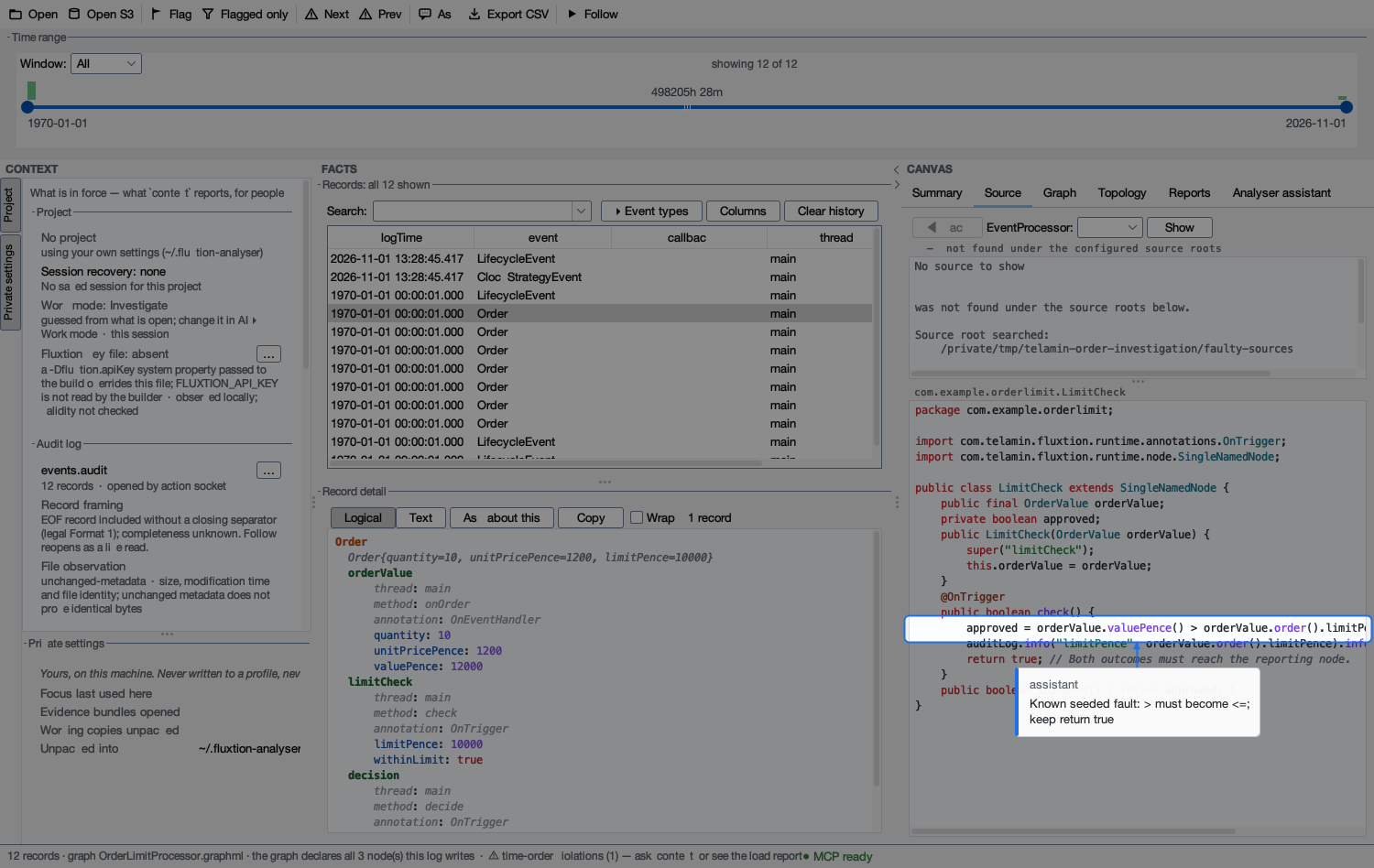
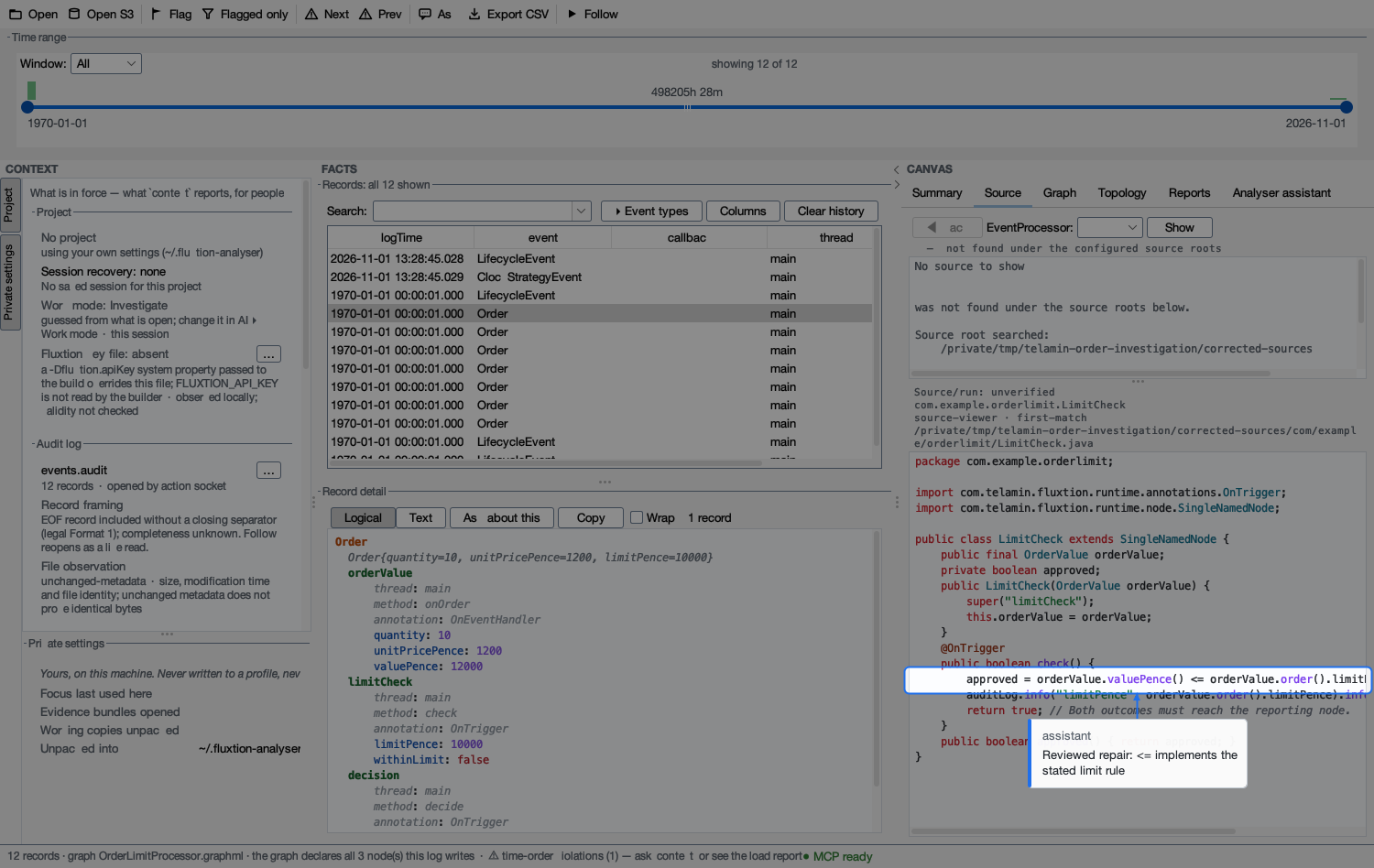
To reopen the investigation in the Analyser, save both files in the same folder.
Why this matters
The before-and-after result is measurable: seven wrong decisions become seven correct decisions for the agreed cases. A reviewer can follow the recorded contradiction, inspect the supplied source and check the correction without relying on a confident narrative.
The Analyser created an evidence bundle for reopening this investigation. The HTML reel and PDF provide a readable account to share.
Apply it to your process
Choose a real failure question and agree the required result before investigation. A useful pilot should establish which inputs and state can be captured, which observations are missing, and whether a second reviewer can reproduce and assess the proposed correction.
See the five-stage pilot journeyTechnical appendix: reproduce the result and inspect the files
Run this example
Reproduction prerequisites
Use Python 3 and JDK 21. Download the public, version-pinned runtime below; no account or compiler credit is required for this download or these reproduction runs.
Download fluxtion-runtime 1.1.3 · Published Maven metadata
Maven coordinates: com.telamin.fluxtion:fluxtion-runtime:1.1.3.
The runtime’s published metadata declares AGPL-3.0. Its terms are separate from the example code’s Apache 2.0 licence. See the published licence and product licensing.
Download into the unzipped example directory:
curl -fL https://repo.repsy.io/mvn/fluxtion/fluxtion-public/com/telamin/fluxtion/fluxtion-runtime/1.1.3/fluxtion-runtime-1.1.3.jar \
  -o fluxtion-runtime-1.1.3.jar
Expected SHA-256 (the runner checks this before compiling):
2bd45eb62409403422d5a676a7ad177f1984aa80dc399c20ceb6b467eab4b775Unzip the source package and run from its order-check directory.
Download this example’s source and reproduction package
python3 run.py \
  --runtime ./fluxtion-runtime-1.1.3.jar \
  --out results
Use Python 3, JDK 21 and the separately supplied reviewed runtime. The runner verifies its hash, builds the included source and checks the captured outcomes. No model or generation call is needed.
The package README explains source provenance and the deliberately faulty revision.
Released Analyser 1.40.0 opened the final audit, linked the supplied graph and source context, and exported a genuine .fexp investigation. A separate reviewer reran the native fixtures on the same machine.
Captured files
- faulty/decisions.csv
- faulty/events.audit
- corrected/decisions.csv
- corrected/events.audit
- manifest.json
- Matching application graph
- Open the genuine Analyser evidence bundle
- Actual tool requests and responses
- Capture method, reopen instructions and limits
- Analyser-exported faulty investigation PDF
- Analyser-exported corrected observation PDF
- Bundle member verification
- Tampered-copy rejection receipt
- Investigation artifact hashes
- Reopened saved walk screenshot
Detailed walkthrough
Reproduce the wrong answer
Run the faulty fixture against the GBP 100 limit. Its audit contains the GBP 120 value and an accepted outcome. No limit change is used to manufacture the fault.
Locate the application change
The runner changes one line in LimitCheck.java from <= to >. The generated coordination and graph structure stay the same. This is a seeded business-rule defect, not evidence of a Fluxtion compiler fault.
Pair the records with context
Use faulty/events.audit with the included matching graph and the faulty source produced by the runner. For the corrected capture use the original source. Source pairing is required to avoid explaining one revision with another.
Inspect the recorded contradiction
Codex used an isolated local Analyser REST action socket, with the same supported verbs as its MCP bridge; this capture did not use MCP transport. Record 3 shows value 12000p, limit 10000p, withinLimit=true and ACCEPTED. Supplied faulty LimitCheck.java uses >. This was a known seeded defect, not blind discovery; inference was hosted by OpenAI.
Check the correction
Compare faulty/decisions.csv with corrected/decisions.csv. Below-limit, equality and above-limit cases prevent a correction that merely forces every order to reject. The runner asserts the observed results for both revisions.
Export and reopen the investigation
The genuine .fexp contains the audit, graph, narrative and a saved two-step walk. CLI verification checked four members. Reopening in the same isolated Analyser restored 12 records and resolved both saved step-2 targets. A deliberately tampered test copy failed its log hash check. Source files and flags are not inside the bundle; use the separate source package and exported finding PDF.
Scope and interpretation
- This is a known seeded application defect. The corrected source existed before the investigation; Codex reviewed it and a separate reviewer reran the fixture, but no human repair approval or blind-diagnosis claim is made. No novice-usability, time-saving or token-saving result was measured.
- The tool transcript records actual local REST actions; it is not an MCP-transport or local-model-inference demonstration. Source navigation uses supplied context and does not prove deployed-binary identity.
- The bundle reopened on the same machine in a disposable workspace, not a second machine. Sources and flags do not travel in it; the source ZIP and separate exported PDF supply those materials.
- Audit timestamps jump from initialization wall time to a fixed fixture clock. Analyser reports out-of-order records and unknown stream completeness. This investigation uses record indexes and values, not a time-window or production replay claim.
- Ordinary unsigned member hashes detect changed bytes, not sender authenticity, universal correctness or certification.
- The native runner builds a reversed greater-than comparison and the original less-than-or-equal correction. Each revision receives the same seven inputs in a fresh processor with a fixed application clock after initialization. This is a fixture-driven regression comparison, not replay of a recorded production incident. Screenshots may clip long source lines; the package contains the complete supplied class.
- This seeded fault uses the earlier released three-node order fixture. It is separate from the freshly authored four-node implementation in Example 01; the business rule and checked boundary cases are the same.
Example code is released under Apache 2.0. Runtime, third-party and general customer-output terms remain separate. Member hashes compare bytes; they do not certify a business decision.
- Read and download
- No registration. Pages, PDFs and source package are public for released examples.
- Run the supplied code
- No Telamin sign-in. Python 3, JDK 21 and the separately supplied runtime 1.1.3 JAR.
- Use the playground
- Pre-generated order example runs signed out. Its code editor is best on a desktop or laptop. The first run downloads a Java runtime.
- Generate or interpret
- Your own processor requires sign-in and allowance. Review data flows and licensing before generating.
Continue exploring
Inspect the assistant-authored definition, fresh generation and checked outcomes behind the order rule.
Author an application